Feed

Feed Title: openSUSE News
Uyuni Joins openSUSE Project Ahead of Annual Conference
There are moments in open-source history that feel less like announcements and more like finally saying out loud what everyone already knew.
Eight years ago, during the annual openSUSE conference, the story began on news.opensuse.org with the announcement that Spacewalk was being forked. Today, as we gear up for the openSUSE Conference 2026, that circle is finally closing.
“It was a big moment when we decided to fork Spacewalk and move forward with Uyuni on our own,” said Johannes Hahn, who has been around the Uyuni project since the beginning. “Nowadays, we are still enthusiastic about maintaining the project and about further modernizing and improving it. In practice, we’ve been part of openSUSE for years; the infrastructure, the conferences and the people. Making it official just means everyone else now knows what we already did.”
Members of the project are delighted to share that the Uyuni Project has officially joined the openSUSE Project!
While the people have worked alongside each other since that initial fork, this formal integration marks a major milestone. It makes it easier for new contributors to find their way to Uyuni, gives the community a definitive home, and strengthens openSUSE’s tradition of bringing people together to build powerful, open-source tools that benefit the entire ecosystem.
A Partnership Years in the Making
To understand the significance of this homecoming, it helps to look back at the original fork.
By the mid-2010s, the original Spacewalk project (the foundation for Red Hat Satellite and SUSE Manager, which is now known as SUSE Multi-Linux Manager had reached a turning point. The upstream focus had shifted largely toward maintenance and stabilization. While the wider community remained highly engaged and continued submitting valuable code, many of those external contributions began to sit idle. When it was publicly announced that upstream code contributions would decrease and a call was made for other community members to step up and take over the management role, extensive discussions took place.
Ultimately, the community realized that a fork was necessary to inject new life and inspiration into the project. The goal was never just to maintain the status quo, but to build a collaborative space to innovate together-bringing in a modern React UI, container and Kubernetes integration, and utilizing Salt for configuration management.
To reflect this bold new direction, the project was named Uyuni, after the world’s largest salt flats in Bolivia. It was a nod to Salt, but more importantly, a massive statement of shared ambition.
Upstream First: A Community Without Second-Class Citizens
From the very beginning, Uyuni has been much more than just a codebase. It is a thriving, passionate community of system administrators, developers, and open-source enthusiasts dedicated to solving complex infrastructure challenges together.
While Uyuni serves as the upstream project for SUSE Multi-Linux Manager, its development thrives on a strict “upstream first” philosophy. Let’s be clear: Uyuni is not a stripped-down, feature-limited “free version” of an enterprise product. It is the fully-featured, cutting-edge foundation where every piece of innovation happens first. The project operates on the core principle that the community leads the way, ensuring that everyday contributors drive the project’s future. Everyone sits at the same table and there are no second-class citizens.
The heart of Uyuni is driven by the individuals who contribute code, squash bugs, translate documentation, and help answer each other’s questions in chat channels and forums. Over the years, this collaborative spirit has fostered strong relationships with developers across the open-source spectrum, sharing and receiving contributions with communities like Fedora, Alma Linux, and Rocky Linux.
As a configuration and infrastructure management tool, the code allows us to seamlessly deploy patches, manage configurations, and build containers. But it is the community that ensures the tool remains versatile; it supports a massive range of client systems including openSUSE flavors, SUSE Linux Enterprise Server, Red Hat Enterprise Linux (and its derivatives), Ubuntu, Debian, Amazon Linux, AlmaLinux and more.
Constant Innovation: Uyuni 2026.04
The community’s hard work continues to shine in the most recent release, Uyuni 2026.04. This update brings even more power to the platform by adding full support for RHEL 10 and compatible distributions. It also introduces enhanced security auditing integration and features a brand-new reporting dashboard for Grafana, built by and for the people who use it every day.
Celebrate Together at openSUSE Conference 2026!
Just like the original fork announcement at the 2018 event, this new milestone deserves to be celebrated in person, face-to-face with the people who make it all possible.
The openSUSE Conference 2026 runs from June 25-27 at the Z-Bau in Nuremberg, Germany. Attendance is completely free! People are encouraged to attend the live and virtual Uyuni community hours meeting during the event.
For more information and to register, visit events.opensuse.org. We can’t wait to see you there to celebrate the closing of this circle and the beginning of the Uyuni community’s official next chapter with openSUSE!

Planet News Roundup
This is a roundup of articles from the openSUSE community listed on planet.opensuse.org.
The community blog feed aggregator lists the featured highlights below from June 12 to 18.
Blogs this week cover the release of KDE Plasma 6.7 with per-screen virtual desktops and mic test features, KDE Frameworks 6.27, Agama 22 with redesigned UI and VLAN support, Amarok 3.3.3, syslog-ng 4.12.0, and a Tumbleweed weekly review delivering five snapshots. Also featured are GSoC first contributions, Thunderbird improvements, Symless joining KDE sponsorship, and more.
Here is a summary and links for each post:
The return of the Oxygen theme to Plasma
The KDE Blog goes over the release of Plasma 6.7 on June 16. The Oxygen theme from the KDE 4 era has returned as a full global theme for Plasma 6. What began as a restoration project drew a surprisingly large and positive response and attracted new contributors. Oxygen 6.7 arrives updated for full compatibility with current technologies.
Published Amarok 3.3.3
Victorhck shares an update on KDE’s music player Amarok and explains some of code quality improvements and fixes for compiling across different systems.
Preparing for GSoC: My First Contributions to Autogits
Mario Marín shares his initial contributions to the autogits repository as part of Google Summer of Code 2026. His work on obs-status-service included creating a mock Redis client for local development and testing without requiring a real Redis server, and designing a default service landing page where users can enter OBS project parameters to generate SVG status previews and Markdown snippets. The work reduces infrastructure requirements for new contributors.
If you use KDE in openSUSE16, you can not use RDP
The openSUSE Japanese user group reports that RDP (XRDP) does not work with KDE on openSUSE 16, which defaults to Wayland. The server fails with scp_process_msg failed errors, suggesting compatibility issues between XRDP and KDE on Wayland. Users needing RDP access on openSUSE 16 may need to choose GNOME instead. Meetings related to Leap 16 features and feedback can be found on calendar.opensuse.org.
Lanzado Amarok 3.3.3 «Beyond the clouds»
The KDE Blog celebrates the release of Amarok 3.3.3. The update restores system suspend inhibition during playback, fixes main window layout restoration after restart, resolves context applet height saving issues, prevents duplicate tracks when dragging from file manager to the playlist and more.
Thunderbird will make it easier to collaborate on its Android app
Victorhck reports on the Thunderbird team’s efforts to lower the contribution barrier for their Android and iOS email apps. The team is moving documentation, adding pull request templates including AI usage disclosure fields, and encouraging community involvement through testing pre-release builds, translating, and donating.
Things That Last
Jakub Steiner reflects on longevity and repair culture through a personal story about an annual bike trip to Jakuszyce, Poland. The post contrasts the disposable nature of household appliances with the enduring quality of a well-maintained bicycle that has remained a joy to ride for 15 years, serving as a meditation on what it means to make things last.
Lanzado Plasma 6.7, an exceptional productivity tool
The KDE Blog announces the release of KDE Plasma 6.7 on June 16. Key features include per-monitor independent virtual desktops, a microphone volume testing tool, virtual keyboard special character long-press input, a quick light/dark theme toggle, Vietnamese lunar calendar integration and much more.
syslog-ng 4.12.0, syslog-ng PE 8.2.0 and SSB 7.8.0 are now available
Peter Czánik announces coordinated releases across the syslog-ng product line driven by an SQL injection security fix. syslog-ng OSE 4.12.0 brings performance optimizations making the log processor more scalable, along with numerous user-reported bug fixes.
Releasing version 22
The Agama Installer team announces Agama 22 with a redesigned header and toolbar that improves navigation with persistent product logos, breadcrumbs, and relocated installer tools. New features include configurable appearance with dark and light themes, advanced filesystem configuration options in the disk setup UI, VLAN connection support through the web interface and more. A new access section in JSON configuration simplifies setting up SSH or Cockpit on the installed system.
Windows-style launcher with Tiled Menu Prime – Plasmoids for Plasma 6 (32)
The KDE Blog presents Tiled Menu Prime, the 32nd entry in the Plasma 6 plasmoid series. The Windows 10-style start menu replacement supports pinned applications, resizable tiles in multiple sizes (1x1, 2x2, 4x4, and more), customizable sidebar shortcuts, and letter-jump navigation. It is based on the work of Zren’s original Tiled Menu plasmoid.
Add a keyword so Thunderbird reminds us if we want to add an attachment
Victorhck shares a practical tip for Thunderbird users with customizing attachment reminder keywords. By navigating to Settings → Composition → Attachments, users can add new trigger words like “attached” to ensure Thunderbird prompts them before sending an email without an intended file.
Improvements to stay in the loop
The OBS blog presents two small improvements aimed at helping users stay on top of their workflow. Notification filters are now preserved when returning to the notifications list, so users sifting through large volumes of notifications no longer lose their narrowed-down view. Additionally, global role changes now trigger notifications: users are alerted when one of their global roles is assigned or revoked, and other members of the affected role are notified of the change as well.
Symless is also a KDE sponsor
The KDE Blog announces that Symless, the company behind the Synergy software for sharing a single keyboard and mouse across multiple computers, has joined the KDE sponsorship program. The sponsorship supports KDE’s ongoing development and community initiatives.
Introducing pkgcli: A nicer command-line interface for PackageKit
Matthias Klumpp introduces pkgcli, a new command-line client for PackageKit built to replace the long-stagnant pkcon tool. Developed as part of his work as a fellow for the Sovereign Tech Agency, pkgcli aims to be pleasant for interactive use and easy to script.
Linux Saloon 207 | LibreWolf Web Browser
Nathan Wolf recaps a Linux Saloon episode that opens with Mike (FullScale4me) discussing older computer systems and “Big Iron.” The panel shares thoughts on LibreWolf, concluding it suits privacy-focused users who prioritize security but may not be ideal for casual users. The conversation about privacy gets passionate, and a little spicy.
Linux Saloon 206 | Early Edition
Nathan Wolf previews a Saturday tech-focused session covering open source, gaming, and Linux. Key topics include the compromise of Arch Linux AUR packages and deprecated Linux commands.
Plasma 6.7 is very close – This Week in Plasma
The KDE Blog translates the “This Week in Plasma” report released ahead of the Plasma 6.7 launch. The preview highlights per-screen virtual desktops, a microphone volume test tool, virtual keyboard special character input by long-press, a quick theme switcher between light and dark modes and more.
Twenty-seventh update of KDE Frameworks 6 and KCalendarCore library
The KDE Blog announces the 27th update of KDE Frameworks 6, which arrived in Tumbleweed on June 16. The release spans all major framework modules with bug fixes across KIO, KConfig, KTextEditor, and Kirigami. The post also profiles the KCalendarCore library, which powers calendar functionality across KDE applications.
Tumbleweed – Review of the Week 2026/24
Victorhck and Dominique Leuenberger report on a productive week with five Tumbleweed snapshots (0604, 0605, 0608, 0609, 0610). Key updates included Linux kernel 7.0.11, Mesa 26.1.2, fontconfig 2.18.0/2.18.1, harfbuzz 14.2.1, PHP 8.5.7, KDE Gear 26.04.2, Mozilla Firefox 151.0.3 & 151.0.4, sqlite 3.53.2, systemd 260.2, and file 5.48. Staging highlights include MariaDB 12.3.2, KDE Frameworks 6.27, Linux kernel 7.0.12, KDE Plasma 6.7.0, Poppler 26.06.0, QEMU 11.0.0 dropping 32-bit host support, and GCC 16 as the system default compiler.
View more blogs or learn to publish your own on planet.opensuse.org.
Planet News Roundup
This is a roundup of articles from the openSUSE community listed on planet.opensuse.org.
The community blog aggregates a list of the featured highlights below from June 5 - 11.
Blogs this week cover a photographer pairing rival AMD and Nvidia GPUs on one openSUSE Leap 16.1 workstation to run Adobe software in a virtual machine, a guide for open-source maintainers on avoiding burnout amid a flood of AI-generated security reports, the release of digiKam 9.1 and second bugfix updates for both KDE Gear 26.04 and Kdenlive. Blogs also highlight a dystopian short story about a web where nothing is free, a talk by KDE e.V. in Barcelona, a Digital Sovereignty event in València, the weekly Tumbleweed snapshot reviews, Plasma 6.7 bugfixing and more.
Here is a summary and links for each post:
Rival GPUs Share One Linux Desktop
The openSUSE News team profiles photographer Klaus Tröger, who recently migrated to the openSUSE Leap 16.1 beta. It talks about the use of Adobe and Photoshop in a Windows 11 virtual machine on a workstation. Performance is nearly native and the passthrough components can be cleanly isolated by IOMMU group.
Digital Sovereignty in the AI Era, New Event Organized by GNU/Linux València
The KDE Blog promotes a new event from the nonprofit association GNU/Linux València titled “Digital Sovereignty in the AI Era,” which takes place June 16 at the Universitat de València. Attendance is free, can be joined online and the session will offer concrete alternatives for regaining technological autonomy.
digiKam 9.1 Released, Making it Easier to Use
The KDE Blog covers the release of digiKam 9.1.0, which arrives after three months of active development focused on database migration, preview improvements, advanced search and general ease of use. The post also recaps the major features of digiKam 9.0 for readers who missed the previous release.
Welcome to the Icon Designer Webring!
Jakub revives a piece of 1990s internet culture. Inspired by Terry Godier’s essay “The Boring Internet,” the post argues that an older, slower, federated web built on open protocols still thrives beneath the commercial layer.
Thirty-Fourth Audio of Podcast Linux – “Maratón Linuxero Live” (Podcast Linux #34)
The KDE Blog continues its index of the now-paused Podcast Linux with episode 34. Host Juan Febles chats with four GNU/Linux veterans Gabriel Viso, Patricio García, Alejandro López and Roberto Ruisánchez about the early days of Linux. The conversation revisits the 1990s and early 2000s.
Kdenlive 26.04.2 Released
The KDE Blog announces the second maintenance release of the Kdenlive 26.04 series. The update fixes issues in rendering, timeline editing and project file management across AppImage and Flatpak packages, including a notable Windows fix that allows exporting videos to a network drive.
Everything Has a Price
Victorhck publishes a Spanish translation of Paul Brown’s dystopian short story “No Such Thing as a Free Lunch,” which is a cautionary tale about a future where every click, app launch and settings change carries a fee and free offerings are outlawed. The fiction follows Joe Bloggs through a world of mandatory hardware upgrades, surveillance AI that taxes productivity and brutal enforcement of software regulations. The story is free to read, which in the tale would be a felony.
Fixing All the Things – This Week in Plasma
The KDE Blog translates the latest “This Week in Plasma” report, which focuses on polishing Plasma 6.7 ahead of its release at the end of the month. Notable fixes include Spectacle’s clipboard behavior during OCR text extraction, low-battery notifications for connected devices appearing over fullscreen apps, and a crash fix when refreshing the list of nearby wireless networks.
Linux Saloon 205 | Open Mic Night
CubicleNate recaps episode 205 of the Linux Saloon podcast. Responding to viewer feedback, the panel shared what they like and dislike about their distributions of choice, covering Tumbleweed’s built-in Snapper rollback and overly aggressive default firewall, a panelist’s switch from GNOME to the Fedora 44 Plasma spin, and praise for MX Linux, CachyOS, Linux Mint and Bazzite, before agreeing to test the LibreWolf browser in an upcoming application appetizer segment.
BuildStream and KDE – New Barcelona Free Software Talk
The KDE Blog announces a new Barcelona Free Software talk taking place on Thursday, June 11 at Akasha Hub in Barcelona. Aleix Pol, president of KDE e.V., will present BuildStream, a powerful software integration tool used to build operating systems and all sorts of packages. Attendees will leave knowing how to build their own operating system and hopefully be ready to contribute to many more projects.
Tumbleweed – Review of the Week 2026/23
Victorhck and Dominique Leuenberger report that Tumbleweed kept rolling through a midweek European holiday with six snapshots published. Key updates included Mesa 26.1.1, Qt 6.11.1, GNOME 50.2, Pipewire 1.6.6, Samba 4.23.8 and 4.24.3, plus a Java packaging migration from update-alternatives to libalternatives. The staging dashboard predicts Linux kernel 7.0.11, KDE Plasma 6.7.0, a rework of Python3 packaging and GCC 16 as the system default compiler arriving soon.
Take it Easy. A Guide to Avoid Burnout During the Vulnpocalypse
Danigm offers open source maintainers a survival guide for the so-called Vulnpocalypse, which refers to the cybersecurity reckoning related to AI-generated security reporting. The post argues that 100 percent secure software doesn’t exist, that the deluge of dubious “high severity” reports is eroding CVE credibility, and that maintainers should learn to recognize and disarm manipulation tactics like queue flooding and gaslighting rather than burn themselves out chasing every cried wolf.
Second Update of KDE Gear 26.04
The KDE Blog highlights KDE Gear 26.04.2. The release resolves a good number of errors across applications, libraries and widgets, including a crash in Akregator on arm64, a startup crash in Skanlite via ksanecore, and a fix for Koko’s move-to-trash action overriding the editor’s delete actions.
View more blogs or learn to publish your own on planet.opensuse.org.
Rival GPUs Share One Linux Desktop
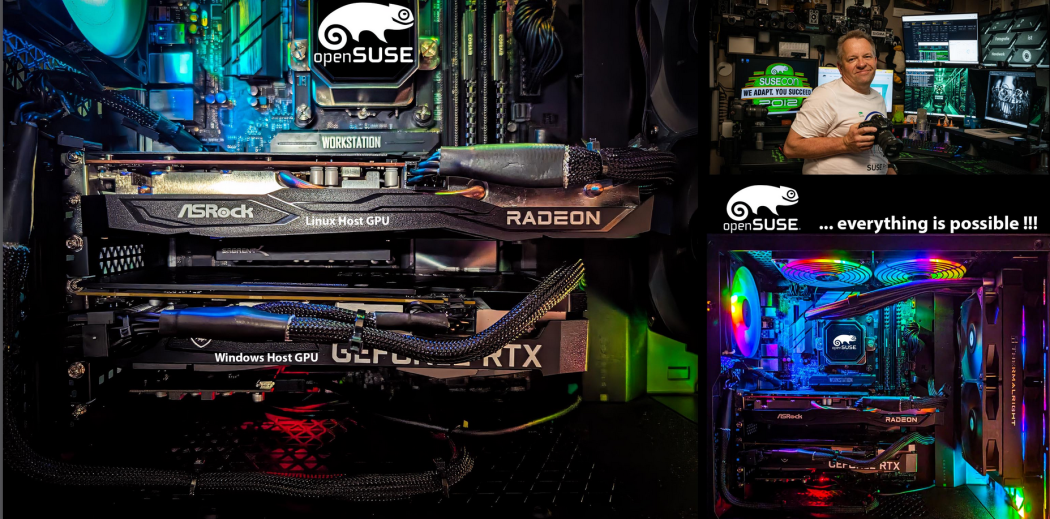
For years, photographer Klaus Tröger built his professional workflow on a quiet contradiction; a Linux workstation running the Adobe software that most people assume belongs on a Mac or a Windows PC.
“I’m not willing to give up Linux, and I’m not willing to give up Adobe,” Klaus said. “So I stopped choosing.”
He has now carried that arrangement onto newer ground. Klaus recently migrated his longtime Debian machine to the beta release of openSUSE Leap 16.1 and has kept editing the whole time, running Adobe Lightroom, Camera Raw and Photoshop inside a Windows 11 virtual machine that never touches the local network directly.
The setup speaks to a small but persistent group of professionals who prefer Linux as their daily environment but cannot abandon Adobe Creative Cloud, whether for client work or long-established editing habits. Open-source alternatives exist, Klaus acknowledges, but they do not always fit an established business.
The hardware behind the system is deliberately dated, and Klaus says that is the point. Rather than chase current components at current prices, he chose Intel’s older LGA-1151 platform, pairing a Core i9-9900K, which is an eight-core, 16-thread chip from Intel’s Coffee Lake generation, with an Asus Z390 WS Pro mainboard. Each was a flagship in its day, he said, delivering strong benchmark performance from the processor and stability from the board. Because the WS Pro has grown rare and expensive, he notes the same approach works with a more common Asus ROG-STRIX Z390-F board and a six-core Core i7-8700K.
The board matters less for speed than for separation. To hand physical hardware to the virtual machine, Klaus relies on the Linux “vfio-pci” driver, which requires that the devices being passed through sit in their own IOMMU group, which is the system the hardware uses to isolate components from one another.
That requirement produces the workstation’s most surprising feature; two graphics cards from rival makers. An AMD Radeon RX 6600 drives the Linux desktop, while an Nvidia RTX 3060 is dedicated entirely to Windows. Contrary to a common assumption, Klaus said, modern Linux handles mixed AMD and Nvidia setups without conflict.
A dedicated graphics card is not optional for the Windows side. Adobe’s software needs a real GPU for post-processing. Software emulation will not do, and the card must clear a modest bar; it needs 1.5 to 2 GB of video memory, DirectX 12 compatibility and a driver no more than seven years old. Passing a qualifying card through to the Windows guest, in its own IOMMU group, lets Adobe applications run with near-native hardware acceleration while Linux remains in charge.
Most consumer mainboards make that separation difficult, Klaus said, because of how they share PCIe lanes and assign IOMMU groups. He offers two ways around it: use the Intel chip’s integrated graphics for the Linux host, the simplest and cheapest option for users with light rendering needs; or run two cards, placing the primary GPU in the CPU-managed first PCIe slot and the pass-through card in a slot managed by the Z390 chipset, which lands them in separate groups.
The rest of the machine follows the same divide-and-isolate logic. A separate USB controller goes to the virtual machine so Windows can have its own keyboard and mouse. Windows lives on its own fast NVMe solid-state drive. Klaus pins 10 processor threads to the host and six to the guest, splits 64 GB of memory evenly between them using huge pages, and swaps the default power daemon for the “tuned” tool set to a virtual-host profile.
He made one deliberate exception. Rather than assign the second NVMe drive straight to Windows, he keeps the guest in a disk-image file on an XFS partition.
“It’s so easy to just copy away the Windows file to get a backup,” he said.
The choice of host operating system was its own deliberation. Klaus had run Debian 13 for its stability. He found openSUSE’s rolling Tumbleweed release too bleeding-edge and Leap 15.6 too dated, which left the Leap 16.1 prerelease as a chance worth taking. The installation, using the Agama installer with an LVM disk layout and a Btrfs root filesystem for snapshots and rollback, produced what he called “zero surprises.”
Performance, he said, is nearly native. Virtualization always carries some overhead, “but it’s fully worth it.” Security is part of the appeal. Windows never sits directly on the local network; it operates behind the Linux host, shielded by the host firewall and additional controls. The arrangement, Klaus said, balances compatibility against exposure. Windows stays available for the few applications that demand it, while Linux runs everything else.
Asked what he would change if he built the machine today, Klaus did not hesitate. “None,” he said. His advice for photographers and power users eyeing a similar build comes down to one decision made early; choose the base hardware carefully, and confirm before buying that the components you intend to pass through can be cleanly separated by IOMMU group. Consumer boards, he warns, often cannot.
openSUSE Asia Summit 2026 Logo Competition Announcement
openSUSE.Asia Summit 2026 Logo Competition
We are excited to announce the launch of the openSUSE.Asia Summit 2026 Logo Competition!
The Summit logo is more than just a symbol—it represents the energy, creativity, and diversity of our openSUSE community across Asia. This year, we invite you to make history by designing a logo that will become the face of the 2026 Summit.
The Summit will take place at the Teaching Industry Learning Center (TILC), Vocational School, Universitas Gadjah Mada (UGM), Yogyakarta. More event details will be shared soon. The logo competition is now open and will close on 21 July 2026. The winner will receive a special “Geeko Mystery Box” from the organizing team!
Submission Deadline: 21 July 2026 Winner Announcement: 3 August 2026
Contest Guidelines
- License: The logo must be licensed under CC-BY-SA 4.0 and allow everyone to use it without attribution if selected. Attribution will be displayed on the Summit website.
- Originality: Your design must be original and free from third-party materials
- AI: AI generated content is strictly prohibited.
- Formats: Submit both monochrome and color versions.
- File Format: Only SVG files are accepted.
- Community Spirit: The logo should reflect the openSUSE community in Asia.
- Prohibited Elements: Do not include trademarks, inappropriate or offensive content, violence, discrimination, political or religious imagery, or any content violating openSUSE values.
- Trademark: Follow the openSUSE Project Trademark Guidelines.
- Branding: Refer to the openSUSE branding guidelines for inspiration (optional).
How to Submit
Send your design to opensuseasia-summit@googlegroups.com with the following details:
Email Subject: openSUSE.Asia Summit 2026 Logo Design - [Your Name]
Attachments:
- Vector File: The logo in SVG format ONLY (Refer to template in Figure 1).
- Bitmap File: A PNG version (minimum 256x256 pixels).
- Design Philosophy: A short TXT or PDF document explaining your concept.
- File Size: Ensure all files are under 512 KB.
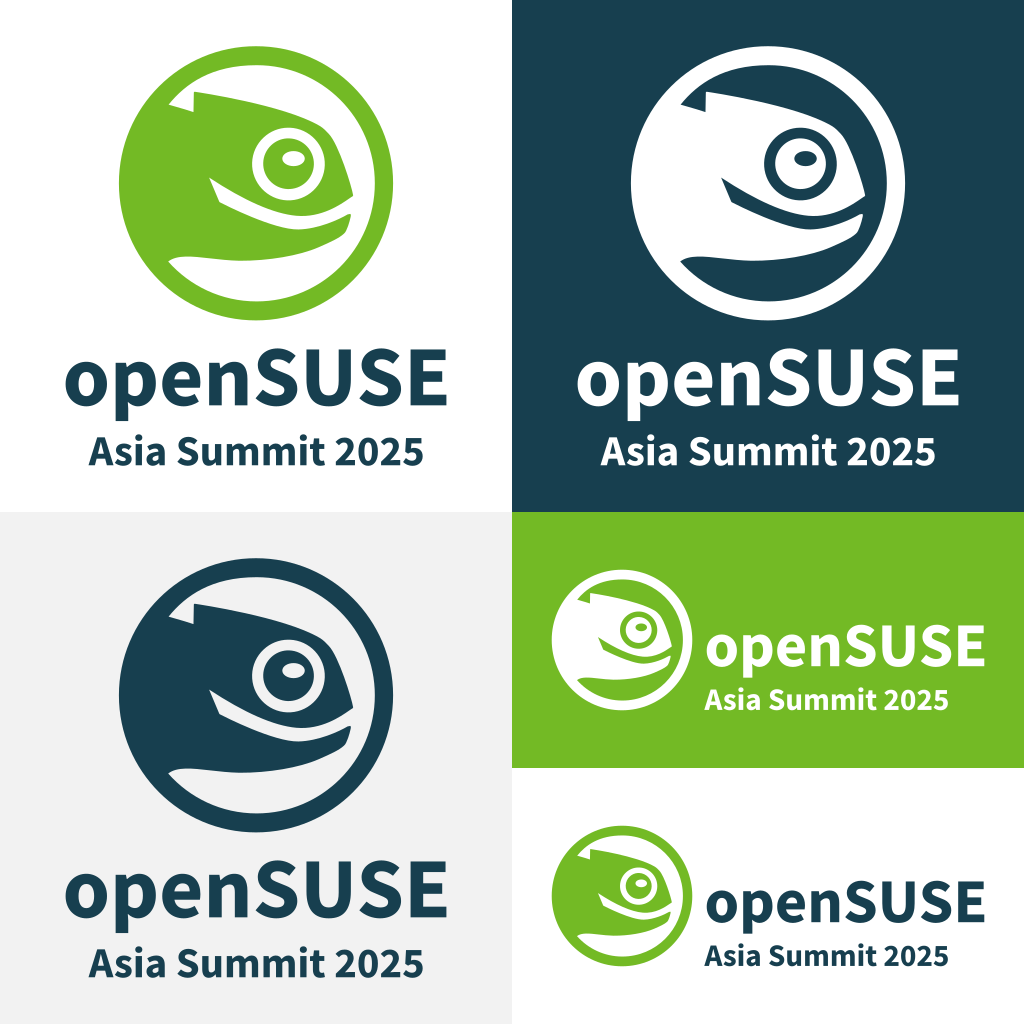
Figure 1. Sample SVG Template for the logo
All submissions will be reviewed by the Summit Committee. Note: The final decision will be made by the committee and may not necessarily be the highest-voted design.
Tip: Use Inkscape, a free and open-source vector design tool!
Let your creativity shine and help shape the identity of openSUSE.Asia Summit 2026. Good luck!