Mermaid Formatter
| Compatible with: R6.3 Current version: 0.1 Credits: WikiAdmin |
Mermaid is a diagramming and charting tool.
https://mermaid.js.org/intro/
1.1. Files
formatter/highlight/mermaid.php
<?php

/**
 * Mermaid diagram formatter for WackoWiki
 *
 * Renders Mermaid diagrams client-side via the Mermaid JS library.
 *
 * Usage:
 *   %%(mermaid)
 *   graph TD
 *     A[Start] --> B{Decision}
 *     B -->|Yes| C[OK]
 *     B -->|No| D[End]
 *   %%
 *
 * Optional parameters:
 *   id = custom element id (auto-generated if omitted)
 *
 * Requirements:
 *   Include the Mermaid library once in your theme (e.g. footer.tpl):
 *
 *   <script type="module">
 *     import mermaid from 'https://cdn.jsdelivr.net/npm/mermaid@12.3.0/dist/mermaid.esm.min.mjs';
 *     mermaid.initialize({ startOnLoad: true, theme: 'default' });
 *   </script>
 *
 * Or load a local copy / pin a specific version as preferred.
 *
 * @see https://mermaid.js.org/
 * @see https://wackowiki.org/doc/Doc/English/Formatters
 */

if (!defined('IN_WACKO'))
{
	exit;
}

// defaults
$options['id'] ??= null;

$options['tpl'] = true;

// unique id for the diagram container
$token = $options['id'] ?? ('mermaid-' . Ut::random_token(8));

// escape the diagram source for safe HTML embedding
// Mermaid reads the text content of the element
$diagram = Ut::html(trim($text));

$tpl->token		= $token;
$tpl->text		= $diagram;
formatter/highlight/template/mermaid.tpl
[ === main === ]
<ignore>
<!--notypo-->
<div class="mermaid-wrapper">
	<pre id="[ ' token ' ]" class="mermaid">
[ ' text | pre ' ]
	</pre>
</div>
<!--/notypo-->
</ignore>
1.2. Installation
- Copy both files into your WackoWiki tree:
-
src/formatter/highlight/mermaid.php -
src/formatter/highlight/template/mermaid.tpl
- Load Mermaid once in the theme (e.g.
theme/default/appearance/footer.php):
$script = <<<EOD
<script type="module">
  import mermaid from 'https://cdn.jsdelivr.net/npm/mermaid@12.3.0/dist/mermaid.esm.min.mjs';
  mermaid.initialize({ startOnLoad: true, theme: 'default' });
</script>
EOD;

$this->add_html('footer', $script);
Must be loaded dynamically via an action or the header / footer.
1.3. Self-hosting Mermaid
The most current stable version is hosted on jsDelivr. You can access the file directly at:
-
https://cdn.jsdelivr.net/npm/mermaid@latest/dist/mermaid.esm.min.mjs - https://www.jsdelivr.com/package/npm/mermaid
js/external/mermaid/mermaid.esm.min.mjs
$script = <<<EOD
<script type="module">
  import mermaid from '{$this->db->base_path}js/external/mermaid/mermaid.esm.min.mjs';
  mermaid.initialize({ startOnLoad: true });
</script>
EOD;
- The ESM build (
mermaid.esm.min.mjs) is the recommended format for modern setups, but requires all its chunk files to be served alongside it. - The UMD build (
mermaid.min.js) is a single self-contained file — simpler to host but uses the global mermaid namespace.
1.4. Usage example
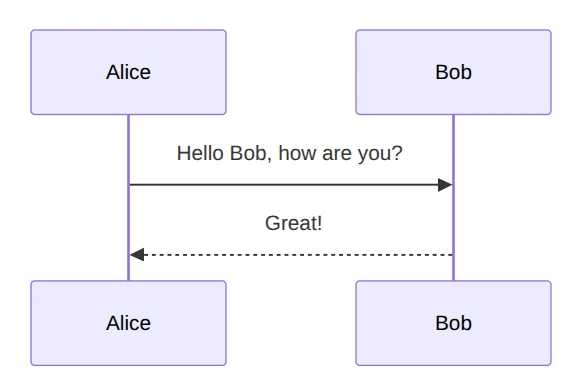
%%(mermaid)
sequenceDiagram
    Alice->>Bob: Hello Bob, how are you?
    Bob-->>Alice: Great!
%%
The formatter emits a <pre class="mermaid"> block. Mermaid’s JS finds these elements on load and renders the diagrams.