Usage of Template Engine
transition template engine for WackoWiki
- push-style (with pull methods for e.g. csrf & i18n) lazy topo-ordered
- incremental building liberated from von neumann style applicative
Guide -> work in progress
What is a Template engine?
- https://en.wikipedia.org/wiki/Template_processor
- Separates visual code (HTML/CSS) from logic code (PHP).
A guide for the new template engine will hopefully follow soon.
- parent file -> associated template
- how do templates work
- concept and internals
-
$tpl->naming - how to process conditions
- how to use filters
add an example template with all cases and examples into the community folder
- action/example.php
- action/template/example.tpl
classes
folders
-
_cache/template -
action/template -
formatter/highlight/template -
handler/page/template -
theme/_common -
theme/default/appearance/template
In other words templates are available for actions, formatters, page handlers and themes.
The corresponding template is loaded using the include_buffered() function in the Wacko class. For example, when action/toc.php is loaded, the system checks whether a corresponding template exists and then also loads action/templete/toc.tpl.
1. Workflow
2. Base File
example.php
$tpl->variable = $value;
2.1. Setting and leaving prefixes
__get/__set helper for generation internal tags:
keeping stack of simple context name prefixes
$tpl->enter('menu_');

$tpl->leave();
2.2. Assign template definition to variable
$variable = $tpl->definitionName();
Adapt the $tpl->myDefinition() name to the corresponding template definition you want to use.
<?php

$message = $tpl->definitionName();

$message->mode        = $this->_t('RenamePage');
$message->log_l_message    = $record['value'];

$this->set_message($message, 'success');
corresponding template
[ == definitionName == ]
<strong>[ ' mode ' ]</strong>
[ ' log ' ]

[ === log === ]
<ul>
	[= l _ =
		<li>[ ' message ' ]</li>
	=]
</ul>
2.3. Hints
Possible error sources
2.3.1. Line endings
If you don't do this in templates, the templating engine will throw an error:
templatest: no main template found in action_or_handler/template/path.tpl
2.3.2. Array building
creates a new array -> EXPLAIN, keep them in order
$tpl->a_b_c
$tpl->a_b
same array
$tpl->a_b
$tpl->a_b_c
2.3.3. Assign arrays
PHP
<?php

$colors = ['blue', 'green', 'red', 'yellow'];

foreach ($colors as $color)
{
    $tpl->n_color = $color;
}
template
<ul>
	[= n _ =
		<li>[ ' color ' ]</li>
	=]
</ul>
3. Template File
template/example.tpl
simple example template

[ === main === ]
	[ ' variable ' ]
3.1. Syntax
[ ' nonstatic ' ]
[ ' commit | void // alternation hack ' ]
3.1.1. Include
.include ../../../_common/_header.tpl
.include _files.tpl
.include _comments.tpl
3.1.2. Definitions
[ === DefinitionTwo === ]
[ ' im DefinitionOne ' ] [ ' title ' ]

[ === DefinitionOne === ]
<img src="[ ' db: theme_url ' ]icon/spacer.png" alt="[ ' title ' ]">
[ === main === ] defines the main template block.
[ == sortsArr == ]
[ = UserList = ]
[ ==== // some text === ] comment
The amount of = equal signs you chose is up to you.
3.1.3. Inline definitions
[ = abc def =
   ...
 = ]
cut off old [= ... =] block, and replace it with lone recall line
3.1.4. Variables
[ ''' l UserList ''' ]
[ '' pagination '' ]
[ ' link ' ]
[ ' // comment ' ]
The amount of ' single quotes you chose is up to you.
3.1.5. Pull
[ ' pull: value ' ]
[ ' csrf: login ' ]
[ ' db: pwd_min_chars ' ]
[ ' format_t: ForgotLink ' ]
[ ' href: properties ' ]
[ ' _t: RealName ' ]
3.2. Filters
[ ' variable | filter1 | filter2 | ... ' ]
[ ' comments | check 2 ' ]
[ ' note | e ' ]
[ ' username | e attr ' ]
[ ' page.hits | number 0 , . ' ]
[ ' a | replace desc uarr asc darr ' ]
[ ' count | enclose " (" ")" ' ]
[ ' preview | nl2br ' ]
[ ' watched | list WatchText UnwatchText | _t ' ]
[ ' created | time_format ' ]
3.3. Examples
-> Available Pulls, Escaper and Filters
3.4. Hints
Possible error sources
put the template.tpl in the correct folder
Warning: Creating default object from empty value in ...
3.5. Filter Chains
Often, multiple filters should be applied to some value in a particular order.
[ ' variable | filter1 | filter2 | ... ' ]
Filter Chains provides a simple method by which filters may be chained together.
Filters are run in the order they are added to the filter chain.
4. Template Cache
Templatest caches the parsed templates to avoid heavy computations.
_cache/template
-
action@template@menu.tpl -
formatter@highlight@template@wrapper_shade.tpl -
handler@page@template@filemeta.tpl -
theme@default@appearance@template@header.tpl
const CACHE_TEMPLATE_DIR = '_cache/template';
The template cache can be purged with the admincache action.
5. Write your own templates
5.1. cheat sheet
[ '  ' ]
[ ' _t:  ' ]
[ ' db:  ' ]
[ ' href: ' ]
[ '  | checkbox ' ]
[ '  | check 0 ' ]
[ '  | number 0 , . ' ]
[ '  | number_format ' ]
[ '  | time_format ' ]
[ '  | pre ' ]
[ '  | e ' ]
[ '  | e attr ' ]

[=  _ =

=]

<form action="[ ' href: add_handler ' ]" method="post" name="add_name">
	[ ' csrf: add_name ' ]

<option value="[ ' id ' ]" [ ' sel | list "" 'selected ' ' ]>[ ' mode ' ]</option>

$tpl->enter('prefix_');
$tpl->leave();
[= l _ =
	<li>
		<a href="[ ' href ' ]" class="tag" rel="tag">[ ' category | e ' ]</a>
	</li>
=]

[ '' l link '' ]

[ === link === ]
<li>
	<a href="[ ' href ' ]" class="tag" rel="tag">[ ' category | e ' ]</a></li>
</li>
-> Theme guide with example templates
6. open issues
meta templates?
What about?
[ ' integer | int ' ]
6.1. next line issue for textarea and pre
- Templatest strips all
\nline breaks from[ ' body ' ]which is in this case undesired. We need all\nline breaks in body for POST or action include. - Additional the auto-indent feature may add
\t.- e.g. in form
<input type="hidden" name="body" value="multi line body">, one should not serve HTML in PHP file and pass it as $tpl->kludge = HTML;
- e.g. in form
All data for <textarea> or <pre> must be passed trough to escape filter as is.
This applies to all textarea fields used in the template engine.
-
showhandler (body may have aprefield) -
_commenthandler (body ->textarea) -
edithandler (body ->textarea) -
permissionshandler (list field holding privileges ->textarea) -
filemetahandler (file caption ->textarea) -
includeaction (body ->pre) -
newsaction (body ->pre)
This example from the news action, breaks formatting of <pre> boxes
$tpl->include = $this->action('include', ['page' => '/' . $page['tag'], 'notoc' => 0, 'nomark' => 1], true);
This example below shows only the \n issue
$tpl->body		= $body; // Ut::html($body)
echo '<textarea>' . Ut::html($body) . "</textarea>\n";
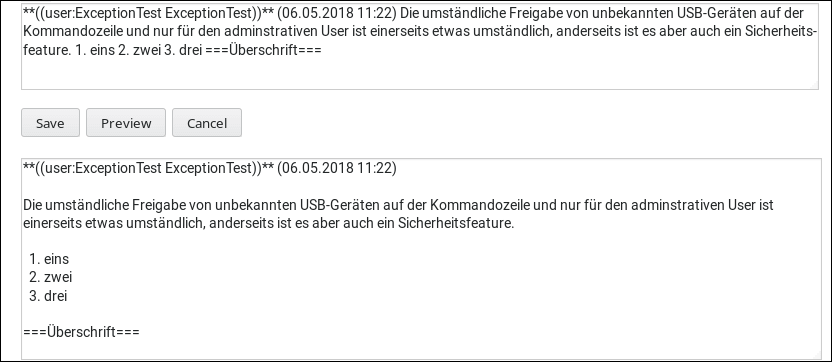
workaround:
- hotfix, handlers
- use
[ ' data | pre ' ], add NO additional filter, run HTML escapingUt::html($data);prior in the PHP file if you have to