Using SQLite

SQLite is suitable for small to medium wikis with low to moderate traffic and is particularly advantageous for portable installations, such as those running from a USB stick, due to its single-file database structure that simplifies backups and migration. It does not require a separate database server, reducing administrative overhead and potential points of failure. However, SQLite does not scale beyond a single server, making it unsuitable for wikis that may grow to have many concurrent users or large amounts of content.
1. Issues to consider
- For advanced search capabilities, MySQL or MariaDB are strongly recommended.
- The decision to use SQLite should ideally be made before creating the wiki, as migrating from SQLite to MySQL later is difficult.
- The database file is typically stored in a directory outside the web root.
-
../data/db_name.sqlite
-
- To ensure optimal performance, the database should be configured in WAL (Write-Ahead Logging) mode.
-
PRAGMA journal_mode=wal;
-
- For full text search functionality, SQLite must be compiled with the FTS5 module, which is commonly included in modern builds.
- Access control is handled through the file-system permissions of the database file.
- SQLite requires that index names be unique across the entire database, not just within a single table.
- The entire database is stored in a single file, which simplifies backup procedures. If the database is offline, a simple file copy suffices for backup.
- A SQLite database file should not be used for more than one wiki. The cache table could be inserted into an additional database file.
2. Installation
2.1. Authorization
Please enter the password you saved in the file config/lock_setup, which you temporarily placed in your Wacko directory.
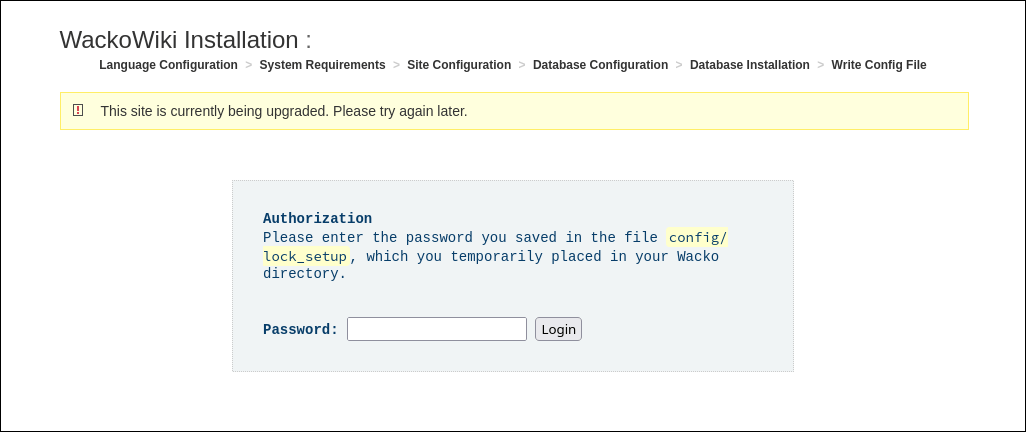
There is an empty file named lock_setup in the configuration folder. Before you can continue with the installation or update, you must add a password.
The password in the file is in plain text and should not be the same as the recovery password. When correct the installer creates a form token valid for 10 minutes which is passed via POST. In the case the token expires the user gets redirected back to the login screen, all data input is discarded.
The password must be set, it won't accept an empty password.
The base SQLite engine does not support usernames and passwords for database access. It is designed as a lightweight, file-based database system that does not include built-in user authentication or access control mechanisms. Instead, SQLite relies on the underlying operating system's file permissions to control access to the database file.
2.2. SQLite settings
The same goes for the database name and path. For security reasons it does not allow the user to set a random database name and path for the SQLite database. The installer suggests a few default Data Directory Locations depending on OS and environment. The database name is predefined.
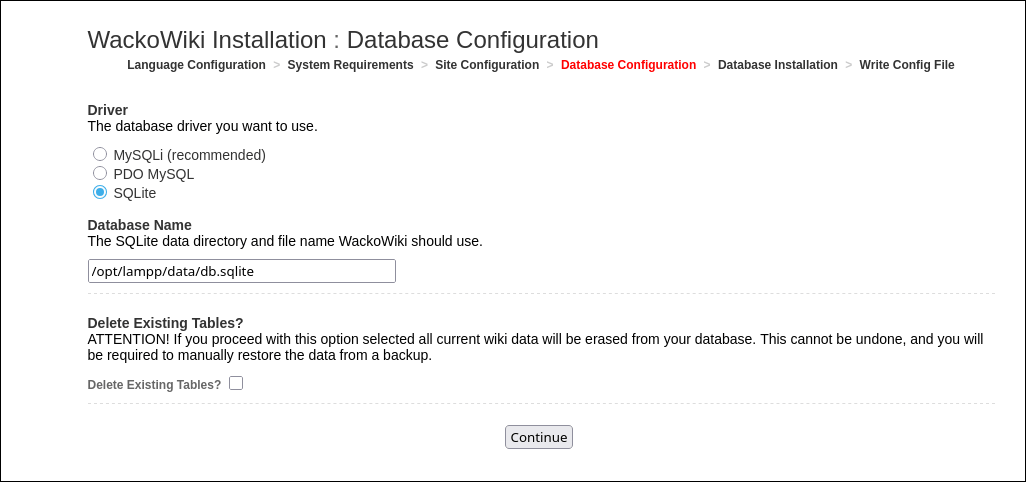
The user can change the database name and path after the installation. In the next upgrade the installer won't touch it, same for backup & restore.
3. Convert your database to SQLite
To convert your database from MariaDB or MySQL to SQLite you can do the following:
mysql-to-sqlite3 – Transfer data from MySQL to SQLite
- on my distro repo the package is:
python313-mysql-to-sqlite3– A simple Python tool to transfer data from MySQL to SQLite 3
Import your database
mysql2sqlite -f /home/user/Download/wacko.sqlite -d db_name -u root -p -K
user@localhost:~> mysql2sqlite -f /home/user/Download/wacko.sqlite -d wacko -u root -K -p
MySQL password:
mysql2sqlite version 2.4.1 Copyright (c) 2019-2025 Klemen Tusar
2025-11-18 10:26:51 INFO     Transferring table doc_page
100%|█████████████████████████████████████████████████████████████████| 1/1 [00:00<00:00,  6.58it/s]
2025-11-18 10:26:52 INFO     Transferring table doc_page_link
100%|█████████████████████████████████████████████████████████████████| 1/1 [00:00<00:00, 16.82it/s]
2025-11-18 10:26:52 INFO     Transferring table doc_referrer
2025-11-18 10:26:52 INFO     Transferring table doc_revision
100%|█████████████████████████████████████████████████████████████████| 1/1 [00:00<00:00,  6.14it/s]
2025-11-18 10:26:52 INFO     Transferring table doc_user
100%|████████████████████████████████████████████████████████████████| 1/1 [00:00<00:00, 239.81it/s]
2025-11-18 10:26:52 INFO     Transferring table doc_user_setting
100%|████████████████████████████████████████████████████████████████| 1/1 [00:00<00:00, 225.21it/s]
2025-11-18 10:26:52 INFO     Transferring table doc_usergroup
100%|███████████████████████████████████████████████████████████████| 1/1 [00:00<00:00, 2972.58it/s]
2025-11-18 10:26:52 INFO     Transferring table doc_usergroup_member
100%|███████████████████████████████████████████████████████████████| 1/1 [00:00<00:00, 1455.85it/s]
2025-11-18 10:26:52 INFO     Transferring table doc_watch
100%|█████████████████████████████████████████████████████████████████| 1/1 [00:00<00:00, 45.21it/s]
2025-11-18 10:26:52 INFO     Transferring table doc_bad_behaviour
2025-11-18 10:26:52 INFO     Transferring table doc_word
2025-11-18 10:26:52 INFO     Transferring table doc_acl
100%|█████████████████████████████████████████████████████████████████| 1/1 [00:00<00:00,  8.58it/s]
2025-11-18 10:26:53 INFO     Transferring table doc_auth_token
100%|███████████████████████████████████████████████████████████████| 1/1 [00:00<00:00, 2910.69it/s]
2025-11-18 10:26:53 INFO     Transferring table doc_cache
100%|███████████████████████████████████████████████████████████████| 1/1 [00:00<00:00, 4156.89it/s]
2025-11-18 10:26:53 INFO     Transferring table doc_config
100%|████████████████████████████████████████████████████████████████| 1/1 [00:00<00:00, 315.60it/s]
2025-11-18 10:26:53 INFO     Transferring table doc_category
100%|████████████████████████████████████████████████████████████████| 1/1 [00:00<00:00, 409.68it/s]
2025-11-18 10:26:53 INFO     Transferring table doc_category_assignment
100%|████████████████████████████████████████████████████████████████| 1/1 [00:00<00:00, 104.83it/s]
2025-11-18 10:26:53 INFO     Transferring table doc_external_link
100%|█████████████████████████████████████████████████████████████████| 1/1 [00:00<00:00, 34.22it/s]
2025-11-18 10:26:53 INFO     Transferring table doc_file
100%|█████████████████████████████████████████████████████████████████| 1/1 [00:00<00:00, 65.26it/s]
2025-11-18 10:26:53 INFO     Transferring table doc_file_link
100%|█████████████████████████████████████████████████████████████████| 1/1 [00:00<00:00, 73.51it/s]
2025-11-18 10:26:53 INFO     Transferring table doc_log
100%|███████████████████████████████████████████████████████████████| 1/1 [00:00<00:00, 2690.38it/s]
2025-11-18 10:26:53 INFO     Transferring table doc_menu
100%|████████████████████████████████████████████████████████████████| 1/1 [00:00<00:00, 226.39it/s]
2025-11-18 10:26:53 INFO     Done!
Move your new SQLite database file to the folder you've defined in config.php, e.g. file/data/wacko.sqlite.
config.php
'db_charset' => '',
'db_collation' => '',
'db_driver' => 'sqlite',
'db_engine' => 'SQLite3',
'db_vendor' => '',
'db_host' => '',
'db_port' => '',
'db_name' => 'file/data/wacko.sqlite',
'db_user' => '',
'db_password' => '',
'sql_mode' => '0',
'table_prefix' => 'doc_',
Add the table for the search index (change the table prefix if different) or use the {{adminupdate}} action to create the missing table.
CREATE VIRTUAL TABLE doc_page_fts USING fts5(
	title,
	body,
	content='{$pref}page',
	content_rowid='page_id'
);
If you have a local installation all should work as expected.
If you have custom actions, handlers or other scripts, check if your SQL queries work also with SQLite. Rewrite your SQL queries so that they work with both MySQL and SQLite. /Dev/NewFeatures/SqliteSupport
4. Tools
- sqlitebrowser
- Letos
- Adminer
- Conversion
- MySQL Workbench: Migration – MySQL Workbench offers a database migration tool that can be used to migrate databases from MySQL to SQLite among other databases.
- mysql-to-sqlite3 – Transfer data from MySQL to SQLite
- sqlite3-to-mysql – Transfer data from SQLite to MySQL
- I haven't tried converting everything back yet.
5. Further Reading
- SQLite
- SQLite Release History
- Appropriate Uses For SQLite – This page provides insights on when to use SQLite over other database systems, which can be helpful for someone considering the transition from MySQL to SQLite.
- PHP
- SQLite Tutorial – A comprehensive guide to SQLite, including how to get started with SQLite, commands, and converting databases. This can be useful for someone transitioning from MySQL.